
The Ultimate
Online TI-84:
Calculator
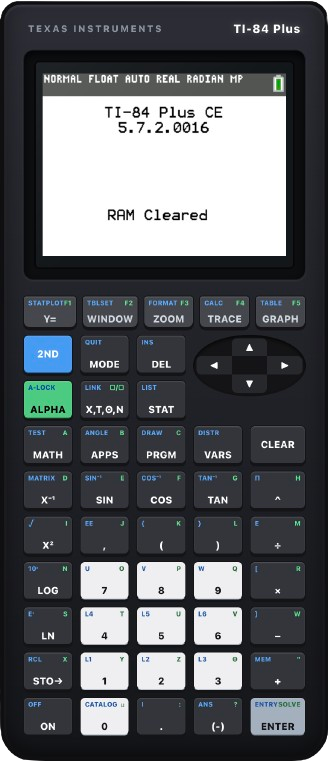
Access a fully functional TI-84 Plus CE graphing calculator emulator directly in your web browser. It is completely free to use—no software downloads, browser extensions, accounts, or logins required. Instantly plot equations, compute statistical summaries, and execute matrix algebra right from your desktop, tablet, or phone.
How to Use Our TI 84 Calculator
Using our online TI 84 calculator is simple. Just navigate to our homepage and start using the calculator right away. You don’t need to sign up or log in. The interface is intuitive, and the functionality mirrors that of a physical TI-84 calculator, so if you’ve used one before, you’ll feel right at home.
Open the Calculator
Access the active, responsive calculation console directly on our website interface with zero installation overhead.
Enter Equations or Expressions
Input your algebraic structures, coefficients, or values instantly by using either your physical keyboard or the virtual console keypad layout.
Use the Graphing Feature
Plot functions dynamically, visualize numerical coordinate datasets, and instantly compute mathematical intersections.
Explore Advanced Utilities
Dive into complex matrix arrays, statistics calculations, matrix arrays, and deep tools configured for solving calculus or higher algebra problems.
Top 5 TI 84 Calculator Shortcuts for Speed
When you are sitting for a timed exam, every second counts. Master these hardware macros to save critical time.
| Shortcut Combo | Feature / Action | Why It’s a Lifesaver |
|---|---|---|
| ALPHA + Y= | Fraction Menu | Bypasses complex inline parenthesis layouts. Instantly lets you enter clean, stacked horizontal fractions. |
| MATH → ENTER → ENTER | Decimal to Fraction Conversion | Instantly changes long, messy decimal output calculations back into perfect, clean algebraic fractions. |
| 2nd + ENTER | Recall Entry (ENTRY) | Retrieves the exact formula string you just evaluated. Perfect for fixing minor syntax mistakes without retyping. |
| 2nd + (-) | Pull Previous Result (ANS) | Pastes your previous solution value string directly into a new operation string, eliminating manual rounding errors. |
| 2nd + MODE | Universal Escape (QUIT) | The ultimate system panic button. Instantly breaks out of deep submenus or configurations back to a clean home computing layer. |
How to Fix a Blank or Broken Graph Screen
If you typed an equation, pressed graph, and see absolutely nothing, follow this sequence to restore the standard viewport display layout.
Press the ZOOM key, then immediately press the 6 key to activate ZStandard. This forces the grid coordinate layer to immediately reset back to standard -10 to 10 axes limits on both horizons.
If the canvas remains completely blank, open your function configuration screen by pressing Y=. Inspect the explicit equal signs. If the white indicator box surrounding the sign is unhighlighted, hover over it using the cursor keys and press ENTER to reactivate expression rendering.
If a terminal error code states Dim Mismatch during execution, enter the statistical plotting utility via 2nd + Y=. Select Plot 1, switch the radio configuration marker to Off, and retry the calculation. This disables background matrix lists that conflict with basic graphic variables.
Hidden Features and Advanced Utilities
Beyond simple numerical evaluations, the system contains execution engines designed to process advanced algebraic formulas natively.
Numeric Equation Solver
- Navigate into the MATH database list.
- Scroll down and select the Numeric Solver module.
- Input your left expression component into equation block 1, your right expression into block 2, and execute to find the root.
1-Var Statistics Engine
- Press STAT, choose Edit, and enter metrics into list column L1.
- Return to STAT, shift right into CALC, and run option 1.
- Instantly view exact mean, standard deviations, and quartile distributions.
Complex Coordinate Space
- Enter your global settings registry by pressing MODE.
- Scroll down into the coordinate display settings path.
- Shift the focus indicator tracking from REAL layout configurations into the active complex output layout.
Frequently Asked Questions
Quick technical resolutions to common operations inquiries regarding the online emulator system architecture.